Claude for Business: How Founders Use Claude Across Marketing, Sales, Operations and Finance (5-Step Rollout)

Most founders already tried Claude. They asked it for a few emails, a blog outline, maybe a summary of a long PDF. It was useful, then it went back to being a tab they open twice a week. A chat window on its own is not a system.
This guide shows you how to use Claude for business in a way that sticks. It turns what Anthropic documents today into a system you can run: what Claude for business means, which jobs it takes over in each department, a 5-step rollout from your first use cases to team-wide workflows, a real company that did it, and the two Claude prompts we use to start.
The short version:
- Claude for business works when you treat it as a set of repeatable workflows, not as a chatbot you ask random questions.
- Every department has a few boring, repeatable jobs where Claude saves the most time: reporting, first drafts, follow-ups, reconciliation.
- Projects hold the context, connectors plug Claude into your tools, and skills turn a proven workflow into something anyone on the team can reuse.
- Roll it out in five steps: pick the pain, build one project per workflow, connect your tools, package what works, then open it to the team with clear rules.
- Treat Claude like a new hire: check its work until it has earned your trust, then delegate more.
What is Claude for business?
Claude for business means using Anthropic's AI assistant Claude to run recurring work inside a company, across marketing, sales, operations and finance, instead of only for one-off questions. In practice it combines Projects (shared context and instructions), connectors (access to the tools you already use) and skills (packaged workflows), usually on a Team or Enterprise plan so the whole team works from the same setup.
Anthropic also sells a specific package with that focus. In May 2026 it launched Claude for Small Business, a set of connectors and ready-to-run workflows that put Claude inside tools like QuickBooks, PayPal, HubSpot, Canva, Docusign, Google Workspace and Microsoft 365, available on Team and Enterprise plans.
The core: three building blocks, four departments
Everything in this system comes back to three building blocks that are documented in the Claude Help Center as of September 2026:
- Projects: a workspace with its own instructions and a knowledge base of uploaded documents, so every chat inside it starts with your context. Free accounts are limited to five projects.
- Connectors: they let Claude read data from and take actions in your apps. Claude inherits each person's permissions from the connected service, so it can't reach a file the user can't reach (Claude Help Center).
- Skills: folders of instructions, scripts and resources that Claude loads when a task needs them, available on all plans with code execution turned on (Claude Help Center).
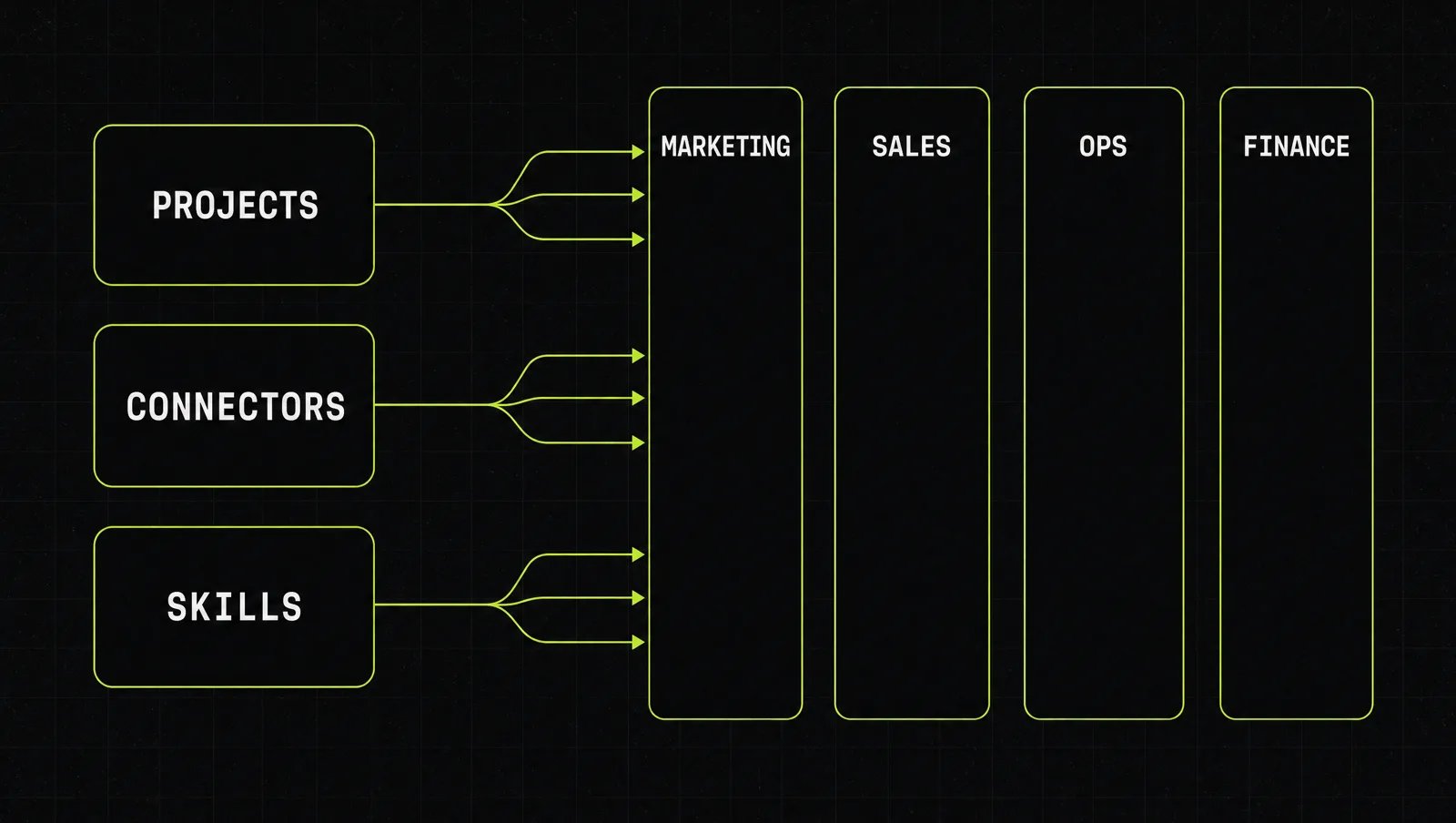
| Department | Typical repeatable job | Building block that carries it | First workflow to build |
|---|---|---|---|
| Marketing | Campaign plans, content, reporting | Project with brand voice and past winners | Weekly content calendar from one source asset |
| Sales | Lead triage, proposals, follow-ups | Connector to your CRM plus a proposal project | Proposal draft from call notes |
| Operations | Weekly briefings, task follow-ups, SOPs | Connectors to email, docs and calendar | Monday brief of what needs attention |
| Finance | Month-end close, cash forecast, invoice chasing | Connector to your accounting tool plus a skill | Overdue invoice list with reminder drafts |
The rows above mirror the workflows Anthropic lists on its small business page: a Monday brief, closing the books, proposals, leads and marketing. The practical rule: a department is "on Claude" when one of its weekly jobs runs through a saved project or skill, not when someone has an account.
How to roll out Claude for business in 5 steps
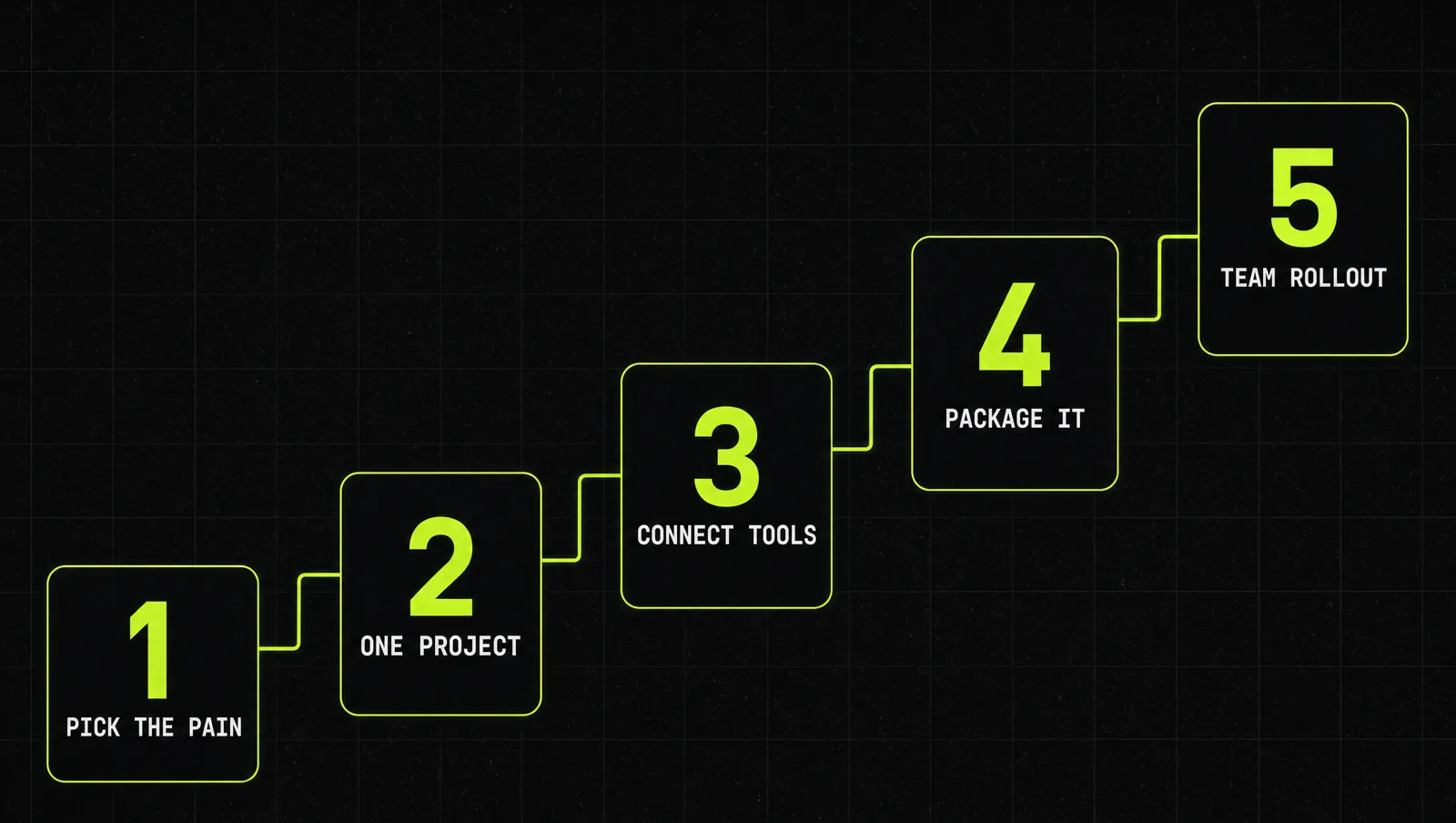
Step 1: Pick three painful, repeatable tasks
Don't start with "AI strategy". Start with the three tasks you or your team dread every week. Anthropic ran free workshops with more than 1,000 small business owners in May 2026 and reported that owners reached first for immediate operational pain like reporting and automation, not growth projects (Claude blog). Good candidates repeat weekly and have a clear "done" state.
Step 2: Build one project per workflow
For each task, create a project. Write instructions the way you would brief a new hire (our Claude prompts for founders show the format): who the customer is, the tone, the format of the output, what to never do. Upload the reference material into the project knowledge: past examples, price lists, templates. If you want a deeper walkthrough, we cover this setup in Claude as your operations system.
Step 3: Connect your tools
Copy-pasting data into a chat is where most workflows die. Add connectors for the tools the workflow touches, for example your email, drive, CRM or accounting software. Start with read access to the data you need and only let Claude take actions once the outputs have been reliable for a while. Remember that connectors act with your permissions, so connect only services you trust and actually need.
Step 4: Package what works
After a few weeks you will know which workflows produce output you barely edit. Turn those into skills, so the instructions, templates and steps load automatically. Our guide on how to add skills in Claude shows how. On Team and Enterprise plans you can also share a project with teammates as "Can view" or "Can edit" (Claude Help Center). HubSpot described the same pattern: once someone builds a project with the right context and strong instructions, the rest of the team starts using it (HubSpot case study).
Step 5: Roll it out to the team with rules
Now open it up. The Team plan is built for teams of 2 to 150 and adds central billing, single sign-on, admin controls for connectors and no model training on your content by default. Give the team three rules before the first login: which workflows exist, which data never goes in, and who reviews what. In Anthropic's workshops, owners compared Claude to a new employee whose work you verify before you delegate more; a 20-person payroll firm set up PII redaction and a registry of approved workflows before rolling it out to staff (Claude blog).
Claude for business use cases per department
Each job below is small enough to build in an afternoon.
Claude for marketing
- Turn one long asset (a webinar transcript, a podcast, a case study) into a week of posts, an email and a landing page draft, all in your brand voice from the project instructions.
- Build a monthly social calendar from your offers, launches and past top posts.
Claude for sales
- Triage inbound leads against your ideal customer profile and draft the first reply for each qualified one.
- Turn call notes into a proposal using your pricing and scope templates.
- Prepare a one-page brief before every call from CRM history and the prospect's website.
Operations
- A Monday brief: open tasks, overdue follow-ups and meetings that need prep, pulled from your connected tools.
- Write follow-up emails and task lists straight after a meeting.
Finance
- Prepare a month-end close packet and flag entries that don't match between your accounting tool and payment processor.
- Build a simple cash forecast from last months' numbers and known commitments.
- List overdue invoices and draft polite reminder emails for you to send.
For all four, Claude drafts and prepares. You approve anything that leaves the building or moves money.
A real case: how OpusClip's revenue team built its own tools

OpusClip published its results as an Anthropic customer story. The people doing the work were not engineers:
- The B2B revenue team has 10 people, 6 of them in sales and customer success, and none of them had written production code before.
- The go-to-market team started experimenting with Claude Code in October 2025, after the engineering team was already using it.
- They connected Claude to their existing stack through MCP servers, including HubSpot, Mixpanel, Zoom, Linear, Clay and n8n.
- Sales call review went from 5 to 10% of calls reviewed by hand to 100% reviewed automatically.
- Reviewing those transcripts surfaced a support routing issue linked to more than $200K in new pipeline.
- They built an ROI calculator in 60 minutes after weeks of failed internal attempts, which unblocked 5 enterprise deals in the first month.
- Renewal brief preparation dropped from hours to minutes per account.
Look at it through the system:
- Pick the pain: call review and renewal prep were slow, manual and repeated every week.
- Connect the tools: the value came from Claude reading the CRM, call recordings and product data, not from pasted snippets.
- Package what works: the ROI calculator became a tool the sales team uses daily instead of a one-off chat.
- Spread from one team: engineering went first, the revenue team followed once the pattern was proven.
The lesson: the win did not come from a bigger model or a bigger team. It came from pointing Claude at a handful of recurring revenue jobs and wiring it into the tools where that work already lived.
Three use cases
The examples below are illustrative, not real clients. They show how the same rollout looks in very different businesses.
Use case 1: Marketing agency
Before: every account manager writes reports and content drafts from scratch, in their own style.
After: one project per client with brand voice, offers and past winners. A shared skill turns the monthly ad export into a client report. Account managers review instead of write, and new hires use the same projects from day one.
Use case 2: Coach or course creator
Before: the founder answers every sales DM, writes every email and does the books on Sunday night.
After: a sales project drafts replies to inbound leads using the offer page and FAQs. A content project turns each weekly live call into posts and a newsletter. A finance workflow lists unpaid invoices every Friday. The founder approves, Claude prepares.
Use case 3: E-commerce brand
Before: a small team juggles supplier emails, product copy and a spreadsheet forecast nobody trusts.
After: a Monday brief flags low stock and open supplier questions. Product descriptions come from one project with the brand guide. Month-end numbers are reconciled against the payment processor before the accountant sees them.
How we run this with Claude
Inside CopyPasteCEO we run the rollout as a short sequence of Claude prompts, in one chat so Claude keeps the context. Here are the first two, copy-paste ready. Fill in the brackets.
Prompt 1: find your first three Claude workflows
Make it yours · 0/4 filled
You are an operations advisor helping a small business adopt Claude. My business: [WHAT YOU SELL], to [WHO], with a team of [TEAM SIZE]. Here is what a normal week looks like for each department: marketing [TASKS], sales [TASKS], operations [TASKS], finance [TASKS]. Score every task from 1 to 10 on how often it repeats, how long it takes and how clear the finished result is. Then pick the THREE tasks I should hand to Claude first and explain why, and name one task I should NOT automate yet.Prompt 2: write the project brief for one workflow
Make it yours · 0/4 filled
I want to set up a Claude project for this workflow: [WORKFLOW NAME]. The input is usually [INPUT, e.g. call notes, CSV export]. The finished output is [OUTPUT, e.g. proposal, report] for [WHO READS IT]. Here are two good past examples: [EXAMPLE 1], [EXAMPLE 2]. Write the project instructions: role, context, tone, output format, rules and a checklist Claude runs before handing the result back. Then list the documents I should upload to the project knowledge and the tools I should connect.These two prompts get you from "we have Claude" to three working projects. Deciding which workflows to package as skills, what data stays out and how to get the team to actually use it is where most people get stuck, because that is where judgment matters more than templates.
Where most people get stuck
Signing up takes two minutes. Making Claude part of how the business runs takes a few focused weeks, and most teams stall early:
- They stay in the chat window. No projects, no connectors, so every conversation starts from zero and nobody else can reuse the result.
- They automate everything at once. Ten half-built workflows and no one trusts any of them.
- They roll it out without rules. No list of approved workflows, no review step, so one bad output kills the team's trust.
That is exactly the gap the Inner Circle is built for: the playbooks to run Claude in every department, a new playbook every week, and founders who are rolling out the same workflows in their own businesses next to you.